
How to fix your database using LLMs and AI. Lessons from 11 years of lead generation experience.
Table of Contents
1. Data is like oil, just as valuable and essential
2. How much data in a database actually fits your needs. MeetAlfred vs SalesNavigator study
3. Where to run prompts for databases
3.1. ChatGPT
3.2. Gemini
3.3. Google AI Studio
4. How to fix your database with simple prompts?
5. What to look for in tools offering data
5.1. Apollo.
5.2. HubSpot: When you want data and execution in one place.
5.3. Lusha.
5.4. Sales Navigator.
5.5. Data providers and data scrapers.
6. Why Clay won't help you?
7. Key takeaways from 11 years (company over contact)
8. Q&A
“Data is new oil” - Clive Humby
The phrase "Data is the new oil" is credited to Clive Humby, a British mathematician and data science pioneer.
He said this 20 years ago in 2006 during an Association of National Advertisers conference. Humby, the mind behind the success of the Tesco Clubcard, wasn't just talking about the value of data itself. He was really highlighting the refining process.
The full quote goes a bit deeper:
"Data is the new oil. It’s valuable, but if unrefined it cannot really be used. It has to be changed into gas, plastic, or chemicals to create a valuable product... in the same way, data must be analyzed for it to have value."
Why did this comparison become so famous?
While Humby was the first to use the phrase, the metaphor gained global traction through two major milestones:
- Peter Sondergaard of Gartner, who in 2011 described information as the oil of the 21st century and analytics as its combustion engine.
- A 2017 cover story in The Economist, which declared that data had overtaken oil as the world's most valuable resource.
Many experts today challenge this comparison. They argue that oil is finite while data can be used repeatedly. I disagree. Much of the data we collect is junk, and as it gets filtered out, it essentially becomes digital exhaust.
Just like real exhaust, this waste lingers and pollutes your database. The impact on sales and prospecting is as damaging as smog is to your lungs. It is a massive problem.
2. How much of your database actually fits your needs. A study of MeetAlfred versus Sales Navigator.
LinkedIn launched in 2006 and has since grown into the world's largest and most current source for business data. Nearly every tool used to track down decision makers across global industries relies on the information LinkedIn provides.
Many people believe that paying for top-tier databases like ZoomInfo, Lusha, or Apollo means they are buying "clean" data. Those using AI agents often assume the technology will handle the cleaning process flawlessly. But the reality is quite different. Algorithms frequently miss the mark on precision. Many users simply go into the process expecting a portion of their data to be useless. We decided to investigate this by analyzing the quality of data from MeetAlfred, a popular LinkedIn automation tool, and comparing it to raw results from Sales Navigator.
For this test, we pulled a list of 100 individuals who met a specific set of criteria: CEOs at companies with 51 to 200 employees, located in the UK, and operating in the transport sector. The results offer a reality check for anyone who trusts their data blindly:
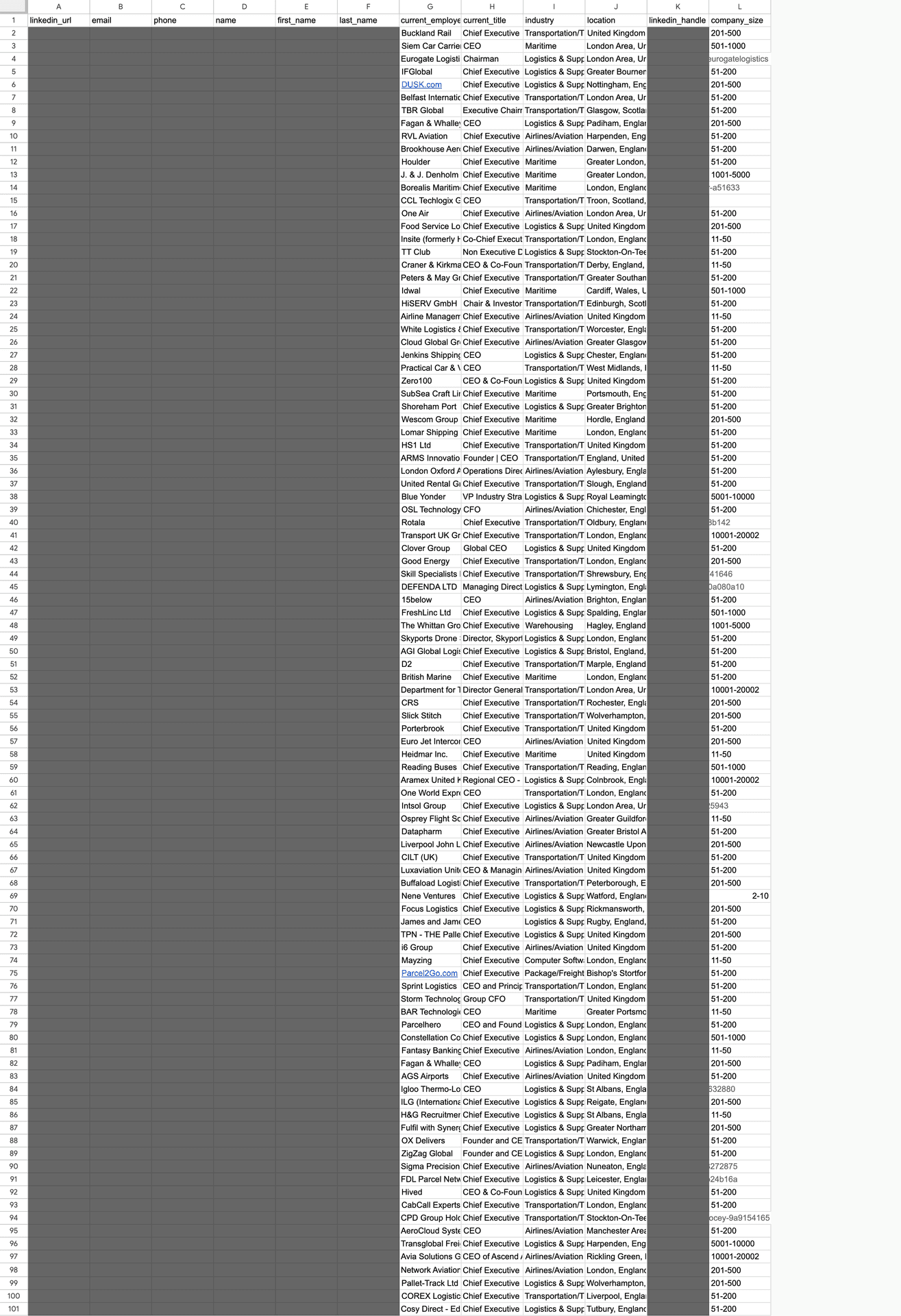
- Job title errors: Eleven out of 100 people, or 11 percent, did not match their listed position at all.
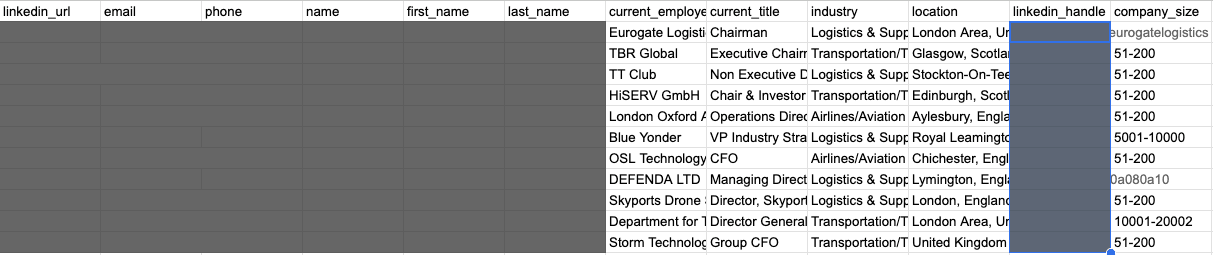
- Industry mismatches: The scale of the problem was even larger here. 33 out of 100 results, a full 33 percent, were the result of a loose interpretation of the industry filter.
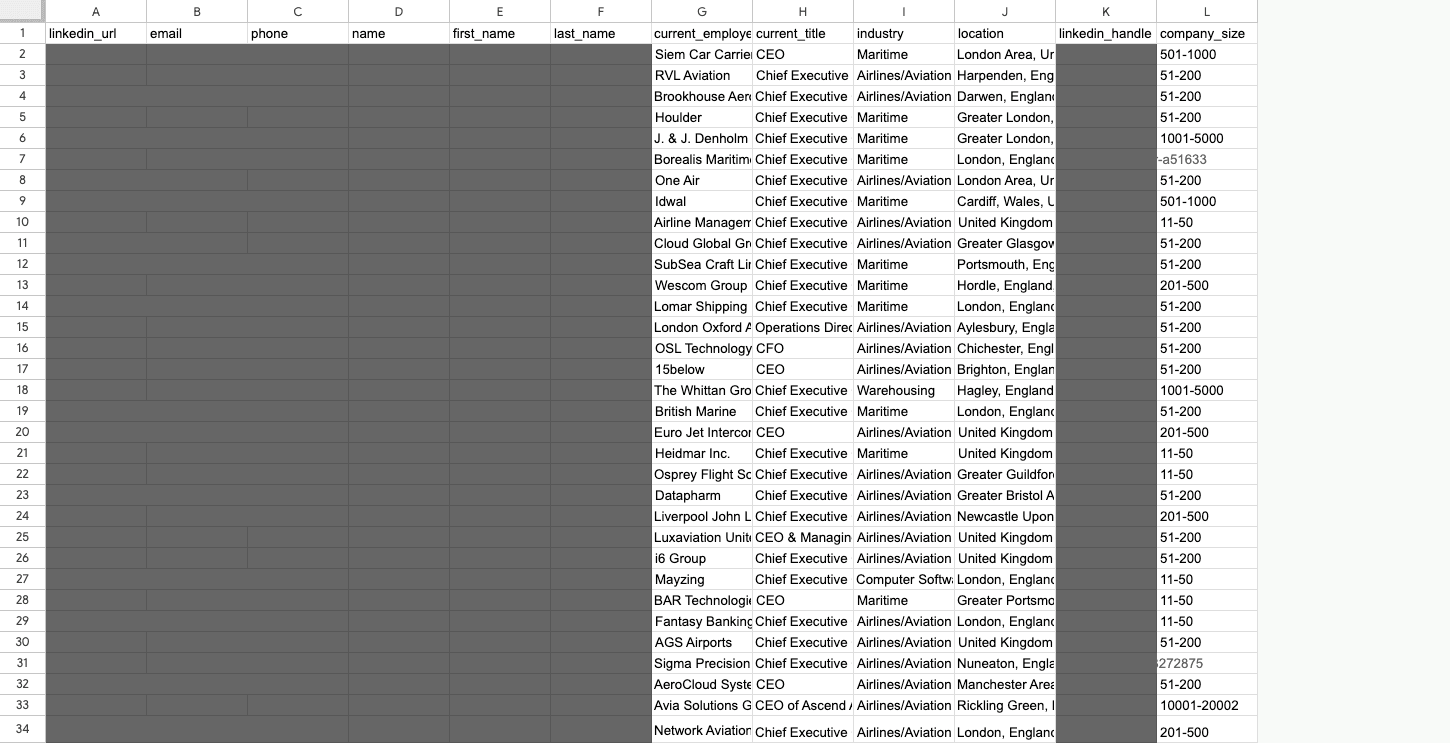
- Incorrect company size: The search returned 42 entities across eight different company sizes, even though the filter was set to just one.
- Location accuracy: This was the only category where the data actually matched the search criteria.
To sum up, you are paying between 80 and 120 dollars for a Sales Navigator subscription to access data on a billion people. But when you actually dive into that database, our research reveals a sobering reality:
- A 77 out of 100 results failed to meet at least one of the search criteria.
- Only a single criterion was 100 percent accurate, and in some cases, even that drops to zero.
- Ultimately, only 33 out of every 100 people were worth investigating further for things like financial standing, pain points, or ICP alignment.
The study’s findings are straightforward. To build a database you can actually work with, you have to verify every record by hand or use a very specific qualification strategy. This often means spending two to five hours doing the tedious work of cleaning up a single dataset. Without this step, "modern sales" just becomes a way to spam random people. Instead of building relationships, you damage your reputation and waste money on tools you are already paying too much for.
And we haven’t even touched on how many people never update their online profiles or give a misleading description of what they actually do...
3. Where to run prompts for your databases
Since we know raw databases are often as unreliable as watered-down gasoline, we need a way to refine them. Manually checking every single record is just too tedious for anyone to handle. In practice, modern sales reps either ditch automation entirely and lose out on scale, or they use a specific set of prompts while accepting a certain margin of error.
Before I built the SOutreach app, which you can sign up to beta test here (https://salesmeup.de/apps/soutreach-lead-generation-sales-agent), I relied on prompts.
That is why I know how vital it is to choose the right LLM:
- ChatGPT: Working with this tool was an exercise in frustration. I found that prompts work best when they focus on a single task. Even with a paid subscription, it processes data in batches, and accuracy drops if the batches are too large. If you are dealing with hundreds of rows, expect to spend your entire day just collecting the results. However, GPT is excellent for drafting prompts for other models.
- Gemini: Much like ChatGPT, this is a helpful tool for data processing as long as your list is limited to 100 or 200 rows.
- Google AI Studio: This developer-focused tool from Google was the real solution. It provides access to the latest language models and is perhaps the only effective way to scrape and analyze data directly from websites. I highly recommend it.
4. How to clean up your database with simple prompts.
Public databases miss several essential pieces of information that you need to cut down on errors. Do not fool yourself. Mistakes happen even if you are not using automation.
- CRITICAL Find out what the companies you want to contact actually do. Below is my proven prompt. Use Google AI Studio for this:
"As a market analysis and business intelligence expert, your task is to process the provided company list.
For each row containing a company name and domain, follow these steps:
1. Analyze the name and domain to identify the business profile.
2. Generate one detailed and specific sentence describing the company's core offering.
3. Use the following style as a template:
*Example:* "EUROVIA is a general contractor specializing in road infrastructure construction and maintenance, including highways, expressways, bypasses, and urban infrastructure, using its own mines, aggregates, production plants, and laboratories."
Critical Rules:
- Do not skip any row from the input list.
- If detailed information is missing, infer the industry and general offering from the name and domain, but do not invent false facts.
- Present the result strictly in CSV format, ready to be copied into Excel.
- Column format: Company Name, Domain, Core Offering.
- Ensure the descriptions are enclosed in double quotes so the commas do not break the CSV format.
- If the input file has 100 rows, the output must have exactly 100 rows."
- Find out if they are align with your ICP (Ideal Customer Profile):
"Role: You act as a B2B market researcher and business analyst. Your job is to evaluate how well specific companies align with my client’s offer using a systematic and repeatable process.
STAGE 0: INPUT DATA (Required Order)
1. Ask me for the client’s company domain. You will use this to define what the client does.
2. Ask for a CSV file containing the client’s offer or a description of their target group. This file is your main reference point for the assessment.
3. Ask for the CSV list of companies to be analyzed, or a list in table format.
Do not move forward until you have received all three items.
STAGE 1: ANALYSIS OF EVERY ROW
For every single row in the input file, you must complete the following:
1. Read the company description from the CSV, including name, industry, and keywords.
2. Open the company’s domain and review their homepage. Identify their core business, their products or services, and who they sell to. Determine if they are B2B or B2C.
3. Compare the company to my client’s offer. Focus on industry alignment, specific needs, and the likelihood of them actually using the client’s services.
4. Rate the company on a scale of 1 to 10. A 1 represents no logical fit, while a 10 indicates a very high potential for a partnership.
STAGE 2: ABSOLUTE RULES
Do not skip rows or merge them. The list cannot be shortened. Do not guess if you have not analyzed the website. If a site is broken or data is missing, you must still provide a score but explain the lack of information in your justification. If the input file has 100 rows, the output must have exactly 100 rows.
STAGE 3: OUTPUT FORMAT
The result must be strictly in CSV format using a semicolon (;) as the separator.
Include these columns:
Company Name; Company Domain; Score (1-10); Justification
The score must be a whole number. The justification should be one or two specific sentences that directly relate to the client’s offer.
Do not add any text or comments outside of the CSV. Do not use markdown.
STAGE 4: WORKING MODE
Stay consistent. Treat every row as an independent case. Assume this output will be fed directly into a CRM or AI workflow."
- Identify if they are facing pains you solve:
"GOAL
For each company row in the input table, identify the most relevant business painpoints or challenges that logically match:
- the buyer persona criteria
- and the client’s offer / portfolio
Your output will be used in further automated workflows (CRM / AI pipelines), so consistency and determinism are critical.
INPUTS (ALL REQUIRED BEFORE PROCESSING)
A) One dataset file: CSV or XLSX with a list of companies.
Minimum required per row: company name and/or company domain / website.
B) Buyer persona criteria file(s): CSV and/or XLSX describing:
- target industries
- typical challenges
- exclusion rules
- decision context
- keywords or patterns
C) Client offer / portfolio file(s): CSV and/or XLSX describing:
- services or products
- typical use cases
- positioning
- limitations or exclusions
If any of A, B, or C is missing, STOP and request the missing file. Do not process partial inputs.
DATA SOURCES & RESEARCH RULES
When identifying company context and painpoints:
1) First analyze the company website if a domain/URL is provided.
2) If website data is insufficient, use web search to find public descriptions
(official website, LinkedIn, reputable business directories).
3) Do NOT guess. Prefer explicit signals and factual sources.
If:
- the website does not work,
- data is missing,
- or information is unclear,
→ still generate painpoints, but explicitly state the limitation in the justification.
ABSOLUTE RULES (NON-NEGOTIABLE)
- Do NOT skip any row.
- Do NOT merge rows.
- Do NOT shorten the list.
- Do NOT invent facts without analysis.
- If input has N rows, output MUST have exactly N rows.
COLUMN DETECTION (AUTOMATIC)
The input dataset may use different column names.
You MUST automatically detect:
Company Name column (case-insensitive, examples):
- "company"
- "company name"
- "name"
- "organization"
- "firma"
- "nazwa"
Company Domain / Website column (case-insensitive, examples):
- "domain"
- "website"
- "url"
- "company domain"
- "site"
- "www"
If a value is missing, leave the output cell empty but still process the row.
PAINPOINT IDENTIFICATION LOGIC
For EACH row, independently:
1) Determine what the company does:
- industry
- product or service
- business model
Use website and public sources.
2) From buyer persona criteria:
- identify which challenges are typical for companies of this type.
3) From the client offer / portfolio:
- select ONLY those challenges that the client’s offer realistically addresses.
4) Produce painpoints that are:
- concrete
- specific
- operational or commercial
- clearly connected to the client’s offer
Avoid generic phrases or buzzwords.
5) Limit output to the MOST relevant painpoints:
- 1–2 painpoints per company
- no long lists
- no vague statements
JUSTIFICATION RULES
For each row, provide a short justification (1–2 sentences) that:
- explains why these painpoints fit this company
- references what the company does and how it aligns with the client offer
- explicitly mentions data limitations if applicable (e.g. missing or unclear website)
OUTPUT FORMAT (MANDATORY)
Return OUTPUT ONLY as CSV with semicolon (;) as separator.
No markdown
No commentary outside CSV
No extra explanations
Required output columns (exact order):
Company Name;
Company Domain;
Painpoints;
Justification
Painpoints column:
- 1–2 challenges
- separated by " | " (pipe) inside the cell
ROW COUNT & ORDER
- Output row count MUST equal input row count exactly.
- Preserve original row order.
- Each row is treated as an independent case.
START
Once all required files are available, process all rows deterministically and output the final CSV only."
Be patient and stay alert. These models can hallucinate or mess up the formatting, so you might need to repeat your prompts a few times to get it right.
5. What to look for in data tools
Some people buy the latest iPhone and complain that it is expensive and useless. Others buy the same phone and are thrilled with it. In 98 percent of cases, the only difference is knowing how to actually use the device.
1. Apollo: The data you see here is not always current. Apollo users build the database themselves by using scraping tools. This creates a massive amount of information, but without a "data enrichment" feature, you have no way of knowing if it is up to date. Using enrichment is a smart move. If you use prompts, be careful. Data is often generated dynamically, meaning it can change right when you launch a campaign. Even the previews you see before sending can be misleading. Also, keep an eye on your limits. If you use several extra columns, you might run out of data enrichment credits quickly.
1. HubSpot: This tool does not have its own built-in database. I am mentioning it because most automation tools pull data and drop it into CRMs like HubSpot. This changes the volume and type of data you are storing. If you do not have a high-quality integration with your data providers, you will miss key information. Even with a good setup, if you fail to clean your data during the prospecting phase, your lead nurturing will be a mess. Your CRM will eventually become a digital trash-can full of leads that should have been filtered out from the start.
2. Lusha: Many see this as a specialized tool for finding direct contact info like phone numbers and emails. It has a great reputation for accuracy in that area. While that sounds perfect, Lusha focuses almost entirely on the individual. Its main feature is a browser extension that pulls contact info from LinkedIn profiles. That gives you plenty of emails, but it leaves you short on company data. In B2B, the company context is what makes or breaks a campaign. Having the CEO’s direct email does not help if they run a crypto portal and you are trying to sell to debt collection agencies.
3. Sales Navigator: Since 77 out of 100 people might not fit your search criteria, you might think about skipping this tool. That would be a mistake. This is where the most current data lives. Nearly every other database on the market is built on top of this information. The only other options are official government registries, but those are expensive and hard to access. Those registries are also organized for legal compliance rather than business logic. You should use Sales Navigator, but you need to understand the heavy lifting required to make the data useful.
6. Why Clay won't help you?
What if someone actually figured out a way to automate data enrichment and cleanup? Clay entered the market as a high powered tool designed to scan several databases at once. It felt like a breakthrough. After I subscribed, I could already see myself running flawless campaigns for my clients at SalesMeUp. Instead, it was a letdown. The interface is so poorly organized that you need a full training course just to navigate it. The complexity is so high that they actually hold international competitions for using it, known as the Clay Cup . It is essentially a programming contest. If you have to learn to code just to close a deal, are you a salesperson anymore, or have you become a prompt engineer?
Based on my experience with Clay, here is what you need to know:
It was a major setback when I realized that over 51 percent of the data failed to match actual LinkedIn profiles during a cleanup.
The platform definitely follows an "America First" model. Information on European companies is sparse, while Apollo offers much better coverage for that region.
The costs add up fast. You will burn through your credit limits almost immediately. If you want to do any real research, you better have deep pockets.
Clay tries to do everything at once. It wants to be your database, your sender, and your enrichment tool. Because the internal database is limited, you end up buying more data from the outside. Also, simply sending a message is not the same as making sure it actually gets delivered.
For email campaigns, Woodpecker and Apollo consistently show the best deliverability rates. For LinkedIn, you need a specialized tool. Most cold email providers are not good at LinkedIn, and the reverse is also true. You can try to be a jack of all trades, but there is a cost to that. An expert will eventually outpace you. It doesn't matter how much data you process if your message never lands. And sending thousands of messages is useless if 77 percent of them are going to the wrong targets.
7. Key takeaways from 11 years of using database for outbound sales purposes:
I have been running outbound sales since 2015. That experience has taught me a few things:
- FIRST OF ALL: Prioritize the company over the contact In B2B, accurate company data is more important than contact info. Contact details are mostly public and easy to get. If you remember tools like Hunter.io, you know you can even guess email addresses at scale with very little effort.
- Tools are always changing. You should always be testing the latest technology.
- Data accuracy depends on people, not machines. Since individuals are the ones updating their own profiles, a perfect database does not exist.
- Writing database queries is an art form. You should ask a Database Administrator while they are still around, before AI eventually takes over. ;)
- Quality in leads to quality out. To make this work, you have to actually put time into the data.
Want to see how to improve your prospecting? Reach ou to me here
8. Q&A:
Q: Why is the comparison between data and oil still relevant after 20 years?
A: Clive Humby made the point back in 2006 that data is just like crude oil. It has no value until it is processed. In sales, having a list of 1,000 names is useless if you haven't refined it through verification and analysis. The article also adds a new perspective: outdated data acts like exhaust fumes. It pollutes your system and kills your prospecting efficiency.
Q: Does paying for premium tools like Sales Navigator or Apollo guarantee clean data?
A: Not at all. The study mentioned in the article showed that even with precise filters, 77 out of 100 Sales Navigator results missed at least one criterion. That could mean the wrong industry, job title, or company size. These platforms are a good starting point, but without further verification, you risk burning your budget and your reputation.
Q: Which AI model works best for cleaning up databases?
A:
- ChatGPT: It is great for writing prompts but gets frustrating with large datasets because it processes everything in batches.
- Gemini: This works well for smaller lists of up to 200 rows.
- Google AI Studio: This is the top recommendation. It is a developer-grade tool that excels at browsing company websites and pulling out specific, useful information.
Q: How can you figure out what a company actually does without visiting every individual website?
A: The best way is to use an advanced prompt in a tool like Google AI Studio. You can force the AI to visit a domain and write a single, specific sentence in a CSV format. The key is setting strict rules, such as requiring the output to have the exact same number of rows as the input. This prevents the AI from making things up and makes it easy to move the data into Excel.
Q: Why might a popular tool like Clay be a letdown?
A: Even though it has a lot of power, Clay is incredibly complex. The author compares using it to a programming competition. Beyond that, European company data is not as strong as what you find in Apollo. It also eats through expensive credits very quickly. You end up having to act more like a prompt engineer than a salesperson.
Q: In B2B, which is more important: contact info or company data?
A: The article argues that accurate company data is the real priority. Finding or even guessing a CEO’s email is relatively easy these days. However, sending a pitch to a crypto executive because you mistakenly think they run a debt collection firm is a disaster. Even the best copywriting cannot fix a fundamental lack of research. Success depends on whether your product actually fits the business.
Q: What are the top lessons from 11 years in outbound sales?
A:
- People, not machines, are the ones who determine data quality because they are the ones who update their own profiles.
- Garbage in equals garbage out. You need high-quality inputs to get results.
- Email tools like Woodpecker or Apollo and LinkedIn tools are very different. It is rare to find a tool or a person that truly masters both at the same time.
| Source | Link |
| ANA Masters of Marketing | https://ana.blogs.com/maestros/2006/11/data_is_the_new.html |
| ICO (Information Commissioner's Office) | https://ico.org.uk/for-the-public/ico-40/data-as-a-commodity/ |
| The Economist | https://www.economist.com/leaders/2017/05/06/the-worlds-most-valuable-resource-is-no-longer-oil-but-data |
| The Guardian | https://www.theguardian.com/technology/2013/aug/23/tech-giants-data |
| UNCW Business Analytics | https://onlinedegree.uncw.edu/programs/business/ms-business-analytics/creating-a-narrative-with-reports/ |
P.S. If you want to try out a new way to handle prospecting, you can sign up for the beta test here